





For years, businesses protected their data like a medieval castle: build a thick wall (a…
Read More
Running remote support for a distributed workforce sounds straightforward. Nearly every UK business today relies on remote troubleshooting tools and virtual helpdesks. Yet, a staggering over 60 percent of companies still struggle with avoidable tech support delays and miscommunication. The real edge comes not from buying the latest software, but from building a remote support process that matches your unique technology mix, staff locations, and support challenges. Here is how a tailored approach beats one-size-fits-all solutions every time.
| Key Point | Explanation |
|---|---|
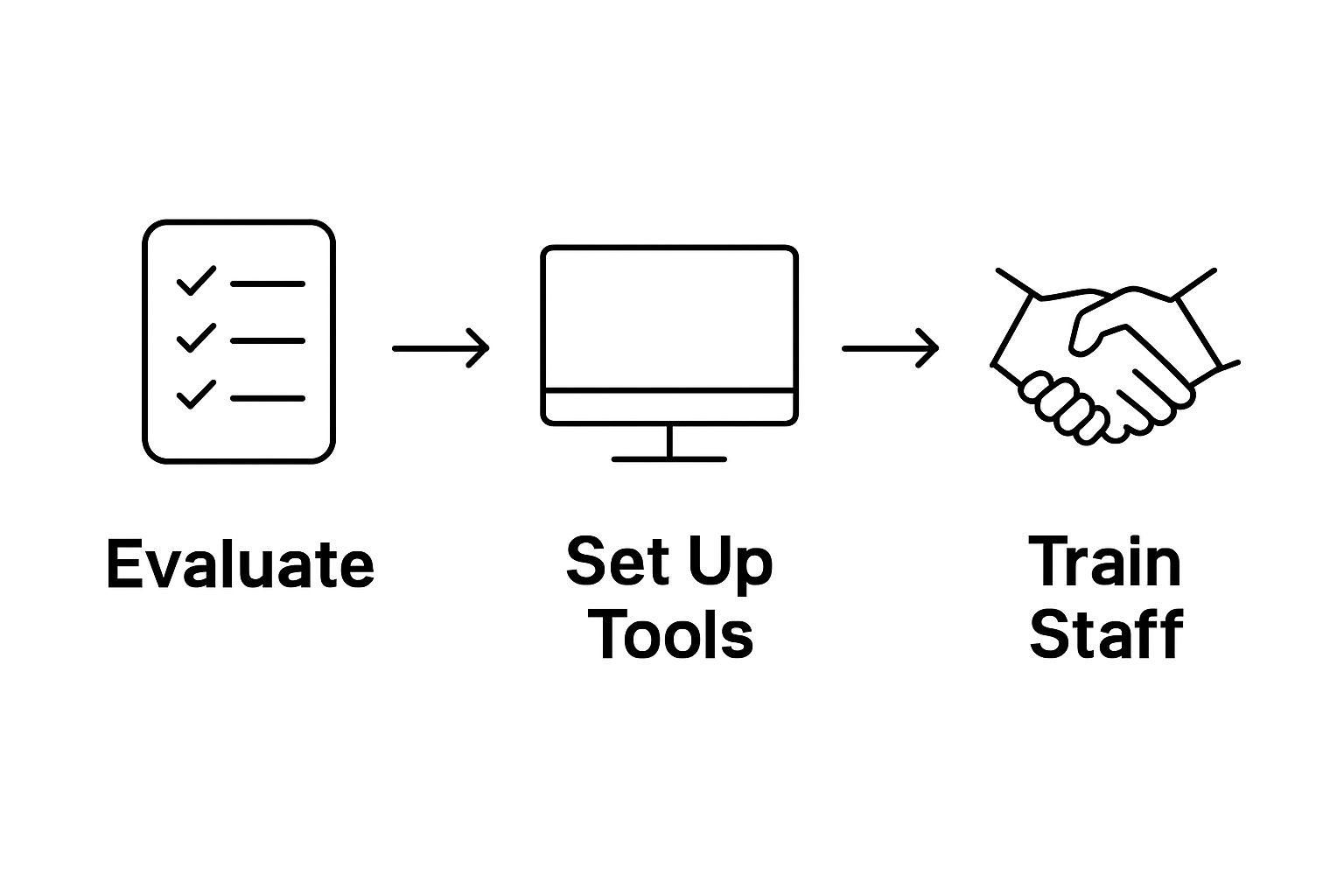
| 1. Evaluate your remote support needs | Assess your technological landscape and support challenges to tailor your strategy effectively. |
| 2. Select secure remote support tools | Choose remote access software prioritising security features and compatibility with existing systems. |
| 3. Implement comprehensive training for staff | Train your team in both technical skills and communication strategies for effective remote support. |
| 4. Execute structured remote support sessions | Follow a standardized protocol to gather information and communicate clearly during support sessions. |
| 5. Regularly gather feedback | Create a feedback system to verify issue resolution and improve future support interactions. |
Establishing a robust remote support process begins with a thorough evaluation of your organisation’s specific technological requirements and support challenges. This critical first step determines the foundation of your entire remote support strategy, ensuring you create a tailored approach that addresses your unique business needs.
Starting your evaluation requires a comprehensive assessment of your current technological infrastructure and support landscape. Begin by mapping out your existing systems, identifying the types of devices your team utilises, and understanding the complexity of your network environment. Consider the diversity of your technological ecosystem, which might include desktop computers, laptops, mobile devices, cloud-based systems, and specialised business software.
Carefully examine the typical support scenarios your organisation encounters. According to UK Government Digital Service, successful user support depends on accurately predicting and preparing for potential technical challenges. Analyse historical support tickets, recurring technical issues, and employee feedback to develop a clear picture of your support requirements.
Your evaluation should also consider the geographical distribution of your workforce. With increasing remote and hybrid work models, your support strategy must accommodate employees working from various locations. This might mean developing capabilities for remote desktop access, secure connection protocols, and multi-platform troubleshooting techniques.
Key considerations during this evaluation phase include:
As you progress through this assessment, document your findings meticulously. Create a detailed report that outlines your current technological landscape, anticipated support challenges, and potential gaps in your existing support framework. This documentation will serve as a critical reference point when designing your remote support process and selecting appropriate tools and technologies.
Successful completion of this evaluation means you have a comprehensive understanding of your organisation’s technological needs, potential support challenges, and the specific requirements for an effective remote support strategy. Your next step will involve translating these insights into a structured, efficient support framework that meets your business’s unique technological demands.
Configuring the right remote support tools and software is a pivotal moment in developing an efficient technological support infrastructure. This step transforms your evaluation insights into practical technological solutions that will enable seamless, secure, and responsive remote support across your organisation.
Begin by selecting robust remote access software that provides comprehensive device management capabilities. Prioritise solutions with strong security features, including end-to-end encryption, multi-factor authentication, and comprehensive audit trails. Look for platforms that support cross-platform connectivity, allowing your support team to seamlessly access Windows, MacOS, and mobile devices without significant configuration challenges.
According to UK Government Digital Service, implementing cloud-based tools requires careful consideration of security protocols. Investigate remote support platforms that offer granular access controls, allowing your technical team to establish precise permissions that limit potential security vulnerabilities. Consider solutions that provide screen sharing, file transfer capabilities, and real-time communication channels to streamline troubleshooting processes.
Integrate your chosen remote support software with existing communication platforms to create a unified support ecosystem. This might involve connecting your remote access tools with your organisation’s messaging systems, ensuring support technicians can quickly escalate and collaborate on complex technical issues. Implementing a centralised ticketing system can further enhance your support workflow, enabling systematic tracking of support requests and maintaining comprehensive documentation of resolved and ongoing technical challenges.
Key technological considerations for your remote support setup include:
During the implementation phase, conduct thorough testing across different device types and network configurations. Simulate various support scenarios to verify the reliability and performance of your selected tools. Develop detailed documentation outlining access procedures, security protocols, and best practices for both support technicians and end-users.
Successful completion of this step means you have a robust, secure remote support infrastructure that enables efficient technological assistance. Your chosen tools should provide seamless connectivity, maintain stringent security standards, and offer the flexibility required to support a diverse and potentially geographically dispersed workforce.
The following table summarises key remote support tools and features to consider, helping you compare options based on essential criteria already highlighted in the guide.
| Tool/Feature | Purpose | Key Specifications |
|---|---|---|
| Remote access software | Enable device management and support sessions | Cross-platform, end-to-end encryption |
| Multi-factor authentication | Enhance login security for support tools | Requires an additional verification step |
| Audit trails | Track actions taken during support sessions | Comprehensive logging, reporting |
| Granular access controls | Limit permissions to reduce security risks | Role-based, custom permissions |
| Real-time communication | Facilitate problem-solving during sessions | Chat, voice, or video capability |
| Screen sharing | Provide visual guidance to end users | High-resolution, interactive |
| Centralised ticketing system | Track and document support requests | Integrated, supports escalation |
The next phase will focus on establishing clear support protocols and training your team to leverage these technological capabilities effectively.
Training your support staff in remote support techniques transforms technological tools into a powerful, efficient support mechanism. This critical step ensures your team can effectively leverage the software and systems you have carefully selected, turning technical potential into practical problem-solving capabilities.
Comprehensive training goes beyond basic software instruction, focusing on developing a holistic approach to remote technical assistance. Begin by creating a structured training programme that combines theoretical knowledge with practical, hands-on experience. Develop scenario-based learning modules that simulate real-world technical challenges, allowing support technicians to practice troubleshooting techniques in a controlled environment.
Your training programme should emphasise communication skills as much as technical expertise. Remote support requires clear, concise communication that can translate complex technical concepts into understandable language for non-technical users. Teach your team techniques for active listening, asking diagnostic questions, and providing step-by-step guidance that empowers users to participate in the troubleshooting process.
Technical proficiency requires deep understanding of your organisation’s specific technological ecosystem. Ensure training covers the nuanced details of your hardware infrastructure, software configurations, and unique network environments. Create comprehensive documentation that serves as a reference guide, detailing specific protocols for handling different types of technical issues, escalation procedures, and security considerations.
Key training focus areas should include:
Implement a continuous learning approach that recognises the rapidly evolving nature of technology. Schedule regular refresher sessions, bring in external experts for specialized training, and create internal knowledge-sharing platforms where support staff can learn from each other’s experiences. According to UK Government Digital Service, effective user support depends on maintaining a dynamic, adaptable support team.
Verify the effectiveness of your training through practical assessments, including simulated support scenarios, written evaluations, and performance monitoring.
 Look for indicators such as reduced resolution times, improved user satisfaction ratings, and consistent application of established support protocols. Successful training transforms your support team from technical workers into strategic problem solvers, capable of navigating complex technological challenges with confidence and expertise.
Executing remote support sessions requires a strategic approach that combines technical expertise, clear communication, and systematic problem-solving. This crucial step transforms your carefully developed infrastructure and training into practical, real-world technical assistance that resolves user issues efficiently and professionally.
Establishing a structured initial contact protocol is fundamental to effective remote support. When a support request arrives, begin by gathering comprehensive information about the technical issue. Develop a standardised intake process that captures essential details such as device type, operating system, specific error messages, and the context of the problem. This initial information gathering helps your support technicians prepare appropriate troubleshooting strategies before initiating direct remote access.
During the remote support session, prioritise clear and patient communication. Guide users through troubleshooting steps methodically, explaining each action and its potential outcome. Break complex technical processes into simple, manageable instructions that non-technical users can easily understand and follow. Use screen sharing capabilities to provide visual guidance, demonstrating specific actions while maintaining a supportive and professional demeanour.
According to HM Courts & Tribunals Service, effective remote participation relies on ensuring technological readiness and providing clear guidance. Apply this principle by confirming system compatibility, network stability, and user preparedness before diving into technical troubleshooting. Verify that both the support technician and the user have stable internet connections and understand the remote access process.
Key considerations during remote support sessions include:
Implement a comprehensive session documentation process that records each step of the troubleshooting journey. This documentation serves multiple purposes: it provides a reference for future similar issues, supports potential escalation if needed, and creates a knowledge base for continuous improvement of your support processes.
After resolving the immediate technical challenge, take time to provide preventative guidance. Offer users practical advice about potential future issues, recommend system maintenance practices, and ensure they understand how to initiate support if similar problems recur. Conclude each support session with a brief satisfaction assessment, gathering feedback that can help refine your remote support strategies. Successful execution means not just solving the immediate technical problem, but empowering users with knowledge and confidence in managing their technological environment.
Below is a checklist table to help verify that each remote support session is properly documented and completed to a high standard, as outlined in the guide.
| Completion Task | Description | Tick When Complete |
|---|---|---|
| Gather comprehensive issue information | Capture device, OS, error message details | |
| Maintain professional communication | Stay calm, polite and clear throughout | |
| Document troubleshooting steps taken | Record all actions and resolutions | |
| Protect user privacy and data | Follow all data protection standards | |
| Confirm resolution with user | Ensure the issue is fully resolved | |
| Provide preventative guidance | Offer advice to help avoid recurrence | |
| Request feedback after session | Initiate satisfaction or feedback survey |
The final stage of the remote support process focuses on comprehensive verification and continuous improvement. Gathering targeted feedback and systematically confirming issue resolution transforms your support from a reactive service to a proactive, learning-oriented approach that consistently enhances technological assistance.
Immediate post-support verification is crucial to ensuring complete resolution of technical challenges. Develop a structured follow-up protocol that initiates contact with the user shortly after the support session concludes. This follow-up should include a detailed confirmation of the original issue’s status, checking whether the implemented solution has fully addressed the technical problem and restored full system functionality.
Construct a multi-layered feedback mechanism that captures both quantitative and qualitative insights. Design a concise survey that allows users to rate their support experience across different dimensions, such as technical competence, communication clarity, and overall satisfaction. Encourage detailed narrative feedback that provides deeper understanding of the user’s experience, revealing potential improvements in your remote support process that might not be captured by numerical ratings.
According to UK Government Digital Service, effective feedback collection involves allowing users to provide input at various stages of service interaction. Implement flexible feedback channels that accommodate different user preferences, including short online surveys, email follow-ups, and optional telephone consultations for more complex support scenarios.
Key feedback collection strategies include:
Establish a robust internal process for analysing and acting upon the gathered feedback. Schedule regular review sessions where support team leaders examine aggregated feedback data, identifying recurring themes, potential systemic issues, and opportunities for technological or procedural improvements. This continuous learning approach ensures your remote support process remains dynamic and responsive to evolving user needs.
Successful completion of this step means developing a comprehensive feedback ecosystem that provides actionable insights. Your verification process should not only confirm immediate issue resolution but also generate strategic intelligence that drives ongoing refinement of your remote support infrastructure. By treating each support interaction as a learning opportunity, you transform technical troubleshooting into a strategic tool for organisational technological advancement.
Are you struggling with slow response times, security worries or the feeling that your remote support tools just do not match your business needs? This guide highlights the importance of evaluating your current systems, securing your remote access, and training your staff for efficient troubleshooting. At J700 Group, we have helped countless Lancashire SMEs end IT headaches by providing ongoing, proactive support and robust technological solutions tailored to their businesses.
If you are ready for faster, safer, and more reliable remote support, do not wait until the next IT challenge disrupts your business. Reach out to the J700 Group team for a personalised consultation. Let us show you how our managed IT services and support can reduce downtime, protect your data and keep your company moving forward. Get in touch now to strengthen your remote support process and reclaim your time.
The first step involves evaluating your organisation’s remote support needs, including assessing the current technological infrastructure, support challenges, and employee distribution.
Selecting robust remote access software with strong security features, cross-platform connectivity, and real-time collaboration tools is essential for an effective remote support setup.
Staff training should include structured programmes with scenario-based learning, emphasis on communication skills, and in-depth knowledge of the organisation’s technological ecosystem.
After resolving a support issue, it’s crucial to gather feedback from the user, verify that the problem is completely resolved, and offer preventative advice to avoid future occurrences.
For years, businesses protected their data like a medieval castle: build a thick wall (a…
Read More
For many small and medium-sized businesses, cybersecurity is still viewed as an IT problem. Firewalls,…
Read More
Cloud technology is no longer a luxury or a cost-saving alternative to on-site servers. For…
Read More
Remember when we jokingly wondered if Apple was borrowing our name? Well, the rumours were…
Read More
AI hasn’t just changed the way we work, it has completely rewritten the rulebook for…
Read More
For many businesses, the office phone is like part of the furniture, it’s always there,…
Read More
We are thrilled to announce a significant milestone in the J700 Group journey. To keep…
Read More
For years, many small and medium-sized business owners in the North West have operated under…
Read More
In a modern healthcare setting, the stethoscope and the blood pressure cuff aren’t the only…
Read More
When people hear the word cybersecurity, they often imagine complex systems, expensive software and specialist…
Read More
As we count down to midnight, most of us are thinking about gym memberships or…
Read More
It’s Christmas Eve in Lancashire. The Preston bypass is a nightmare, the last-minute dash to…
Read More
For many businesses, the Christmas period means quieter offices, reduced staffing and systems left running…
Read More
Or: Why we’d like to have a word with Tim Cook this Christmas. There are…
Read More
Hackers Love Christmas: Learn Why your Business Could be at Risk This Holiday SeasonThe festive…
Read More
In recent months, high-profile companies like Land Rover and Co-op have made headlines due to…
Read More
Explore 7 essential tips for effective cloud solutions comparison to find the best fit for…
Read More
Learn how to secure business data for UK SMEs with this step-by-step guide focused on…
Read More
Cybersecurity basics explained for UK businesses—core concepts, major threats, essential safeguards, and compliance requirements. A…
Read More
Discover the essential role of IT support desks, core functions, key benefits, types of support,…
Read More
Discover 10 microsoft 365 alternatives for UK SMEs, comparing features and benefits to help your…
Read More
Discover the best microsoft 365 alternatives in our comparison of 10 top products to enhance…
Read More
Discover a business connectivity checklist with 7 actionable steps to boost IT reliability, security, and…
Read More
Discover 7 essential business continuity planning steps to protect your SME. Learn practical strategies for…
Read More
Small Business Office 365 comprehensive guide for UK SMEs: core features, setup process, security essentials,…
Read More
Small Business Office 365 guide for UK firms. Learn core features, setup, security, costs, and…
Read More
Small business Office 365 guide covering essential features, security, costs, local support, and practical benefits…
Read More
Follow this cybersecurity checklist for SMEs to secure your business in Lancashire and Manchester. Step-by-step…
Read More
Follow this cybersecurity checklist for SMEs to boost protection, reduce risks, and secure business data…
Read More
Cloud security explained: A comprehensive guide for UK businesses covering threat types, protection strategies, compliance,…
Read More
Data protection strategies for UK SMEs—types, key components, GDPR compliance, business risks, and best practices…
Read More
Why cybersecurity matters for UK businesses: core concepts, main risks, common threats, legal requirements, and…
Read More
Comprehensive guide to IT issues Lancashire businesses face, including security threats, system downtime, cloud solutions,…
Read More
Comprehensive guide on cyber security threats in the UK. Learn common types, key characteristics, real-world…
Read More
Follow this IT security checklist for a step-by-step process to secure your business effectively in…
Read More
Explore the benefits of managed IT services for businesses in Manchester and Lancashire, enhancing efficiency…
Read More
Explore the role of cybersecurity in business. Understand its importance, how it works, and key…
Read More
Discover 7 key advantages of Microsoft 365 for SMEs that can enhance productivity, collaboration, and…
Read More
Explore why use managed IT services and how they benefit businesses. Gain comprehensive insights on…
Read More
Comprehensive guide explaining cyber threats, focusing on their importance, how they work, and the key…
Read More